
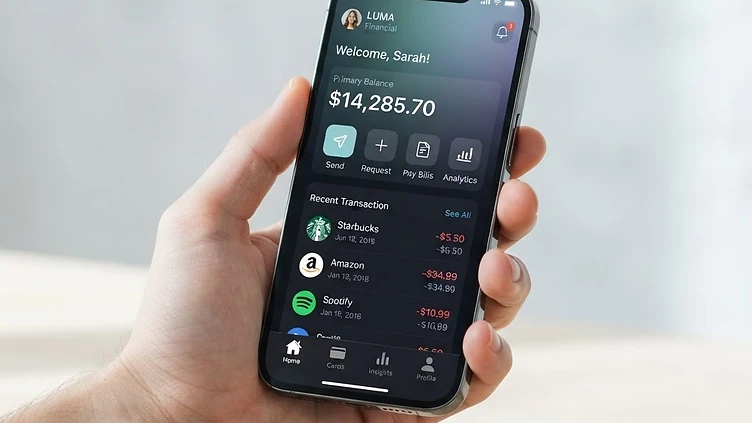
In the digital landscape of 2024, if your website isn't built for mobile, it essentially doesn't exist for the vast majority of your customers. Here in Vancouver, where business owners are constantly competing for the attention of a highly mobile-connected audience—whether they are grabbing a coffee in Gastown or commuting on the SkyTrain—your mobile experience is your storefront.
"Mobile-first" is no longer just a technical buzzword; it is a fundamental business strategy. When we talk about mobile-first design at DWORKS, we aren't just talking about shrinking your desktop site down to fit a smaller screen. We are talking about rethinking the entire user journey through the lens of a thumb.
Designing for the mobile experience requires empathy. It requires understanding that your users are often distracted, on the move, and expecting instant gratification. In this post, we will explore how to craft digital experiences that feel natural, intuitive, and conversion-focused for the modern mobile user.
The Ergonomics of Interaction: Designing for the "Thumb Zone"
When you hold your phone, your thumb covers the bottom third of the screen, reaching comfortably across the center while struggling to reach the top corners. This is what UX designers call the "Thumb Zone."
If you place your most important call-to-action (CTA) buttons at the very top of your mobile navigation, you are forcing your users to adjust their grip or use two hands, both of which increase friction. Friction leads to frustration, and frustration leads to a bounce.
Practical Tips for Thumb-Friendly Design:
- Bottom Navigation Bars: Keep primary navigation, search, and "Contact Us" buttons within the bottom 30% of the screen.
- Avoid Corner Triggers: Gestures that require reaching into the top-left corner are notoriously difficult for right-handed users.
- Large Interaction Areas: Mobile users don't have the surgical precision of a mouse cursor. Ensure your buttons are at least 44x44 pixels to avoid "fat finger" errors.
"The most successful mobile designs feel invisible. When a user can navigate your entire site with one hand while standing on a crowded bus, you have mastered the ergonomics of the thumb."
Speed is the Ultimate Conversion Multiplier
In Vancouver’s fast-paced business environment, patience is in short supply. Google data suggests that as page load time goes from one second to three seconds, the probability of a bounce increases by 32%. On mobile, this effect is compounded by network variability.
Even with our robust 5G networks in the Lower Mainland, a bloated website will struggle. To improve your mobile speed, you must prioritize "lazy loading" images, minifying CSS and JavaScript, and leveraging browser caching.
If you are a local e-commerce brand, every millisecond you shave off your load time correlates directly to a higher conversion rate. We recommend auditing your site performance via tools like Google PageSpeed Insights, but remember: real-world user experience matters more than a raw score. Focus on Largest Contentful Paint (LCP) to ensure your users see meaningful content as quickly as possible.
Simplify Navigation to Save Cognitive Load
On a desktop, you have the luxury of space. You can use large, multi-level dropdown menus with dozens of links. On mobile, that same navigation becomes a labyrinth that scares users away.
To excel in a mobile-first world, you must embrace the "Less is More" philosophy. If a link isn't essential to the user’s immediate goal, strip it away.
Strategies for Streamlined Mobile Navigation:
- The Hamburger Menu (Use with Caution): While standard, a hidden menu adds a click. If your site has three primary goals (e.g., Book Appointment, View Menu, Contact), place those icons directly in the footer navigation rather than hiding them inside a menu.
- Predictive Search: Instead of making users browse through complex categories, provide a high-visibility, predictive search bar.
- Progressive Disclosure: Reveal information only when the user needs it. Use accordions for FAQs or deep content blocks to keep the page length manageable.
Content Legibility: Readability Matters More Than You Think
A common mistake we see in web design is taking a desktop paragraph and simply shrinking the font size. This often results in "micro-text" that is impossible to read without zooming, which ruins the user experience.
On mobile, line height (the space between lines) and line length are more important than font size alone. Aim for a font size of at least 16px for body text, and ensure that your line length isn't too wide. When a line of text spans the entire width of a phone screen, the eye struggles to track back to the start of the next line.
Keep your paragraphs short—two to three sentences maximum. In the mobile context, white space is your best friend. It gives the user’s eyes a place to rest and emphasizes the content that truly matters.
Mobile-Specific Features That Delight Users
Modern smartphones offer hardware features that desktops simply don't have. Using these features can turn a standard website into a powerful, interactive tool for your Vancouver business.
- Click-to-Call/Map Integration: If you run a local service business, your phone number should be a clickable link that opens the dialer, and your address should trigger Google Maps. Never make the user copy and paste your contact info.
- Input Optimization: If you have a lead generation form, use the correct HTML input types (e.g.,
for phone numbers,type="tel"
for emails). This triggers the specific keyboard layout on the user's phone, making data entry significantly faster.type="email" - Biometric Authentication: If you have a client portal, consider integrating with password managers or biometric login options to reduce the friction of typing passwords on a glass screen.
Conclusion: Putting Your Business in the Palm of Their Hand
Designing for mobile is not just about aesthetics; it is about building a bridge between your business and your customers in the most direct way possible. By focusing on thumb-friendly layouts, uncompromising site speed, and simplified navigation, you turn your website into a high-performing digital asset rather than a digital bottleneck.
At DWORKS, we believe that Vancouver businesses deserve digital platforms that reflect the innovation and quality of the city itself. Whether you are a startup in Yaletown or a retail brand in Kitsilano, your mobile site is likely the first—and perhaps only—interaction a customer has with your brand.
Don't let a "desktop-first" mentality cost you valuable leads. It’s time to stop designing for the screen and start designing for the hand. If you’re ready to audit your current mobile performance or want to explore a mobile-first redesign, our team is here to help you navigate the complexities of modern web design. Let’s make your mobile presence work as hard as you do.
Need help with your project in Vancouver?
Request a free quote